A provocative, well-argued and self-explantory presentation. By Ida Aalens (who's the student in question, I believe).
The provocation, to me, was akin to the little boy telling the crowd that the emperor isn't wearing any clothes (some of us librarians anyway).
This is the current reality for libraries and librarians:
LINK
HOW DOES THIS RELATE TO PUBLIC LIBRARIES?
The presentation is from the perspective of a mature student, enrolled in a higher-education course, in an academic library setting. But it's something that's equally applicable to the situation faced by public libraries.
Public libraries have a growing tech-savvy customer base. And every year more students, like the one in the presentation, graduate and join the workforce and become the public library customers (or choose not to).
The idea behind Ida's presentation isn't new. It's the way she presented her arguments that I found refreshing.
Viewing her slides was also timely for me. I've been meaning to post some thoughts about how public libraries should react to such a current reality.
Might as well start with the next few posts.
[Next: Part 2].
Thursday, April 29, 2010


Sunday, April 25, 2010
Public Libraries: "Spot A Reader" for World Book Day 2010
Friend of the Library (FOL), Mr James Seah, blogged about his experience helping out at the first-ever "Spot A Reader for World Book Day 2010", held last Friday on World Book Day and Copyright Day 2010 (23 Apr).
He and his fellow FOLs were at the Circle Line, Bishan MRT Interchange Station, to "spot the readers" in the trains.

[Image linked from source: Blog To Express]
The library obtained permission from the train operator, and had to adhere to the 11am and 1pm time slots within specific train routes.
As James wrote in his post:
Thanks for the post, James. From what he shared, some commuters were delighted to be spotted.
The event organised by the public libraries was a deliberately low-key.
Should the "Spot a Reader" be a regular event in Singapore? What do you think?
He and his fellow FOLs were at the Circle Line, Bishan MRT Interchange Station, to "spot the readers" in the trains.
[Image linked from source: Blog To Express]
The library obtained permission from the train operator, and had to adhere to the 11am and 1pm time slots within specific train routes.
As James wrote in his post:
"The SMRT Guides chaperoned the participants and to comply with instructions. The MRT train is a security and safety public areas not allowed for loitering or hawking business purposes...
We were ensured not to speak too loudly to the commuters, seek their permission and with courtesy, considerate and public decorum. We were required not to disturb the commuters on their train ride, while commuters taking a nap on long journey (as seen some babies in arms). Not to cause unnecessary annoyance when commuters are left alone."
Thanks for the post, James. From what he shared, some commuters were delighted to be spotted.
The event organised by the public libraries was a deliberately low-key.
Should the "Spot a Reader" be a regular event in Singapore? What do you think?
Thursday, April 22, 2010
This librarian shall be conducting a "DIY Music remixing and publishing workshop"
In this earlier post, I mentioned that the conjunction with World Book Day and Copyright Day (Apr 23), the Public Libraries has organised a series of events.
Here's another one this coming Saturday, 24 Apr 2010 (I'm conducting this one, btw):
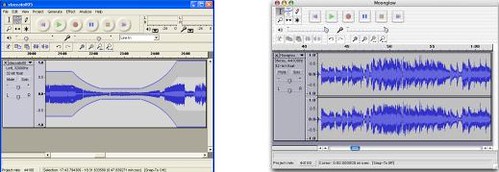
In truth, I had apprehensions about organising this session.
Not from lack of confidence or uncertainty about the content itself. I've done podcasting workshops before, where participants -- with zero knowledge and experience -- were able to create usable audio tracks after 3 hours.
I was concerned about the turn out. Will people turn up? Will there be interest in such a workshop?
We shall see.
More details of how I intend to run the workshop:
I've created a Facebook event page. You may wish to sign up at the Facebook event page.
Currently it's still 1 person attending (me!)
Which is rather scary and maybe even embarrassing... but heck, nothing to be embarrassed about. Even if one person turns up, and is an old lady who knows nuts about computers and wish to learn more, I'd be happy to share :)
[Post-event update: Total of eight people showed up. Sweet! Thanks to Arul, Wan, Raman, Ms Tan, Edmund, Lee, Judy, and Linus. You rock!]
Here's another one this coming Saturday, 24 Apr 2010 (I'm conducting this one, btw):
DIY music remixing and publishing workshop
This is a free hands-on workshop, for and run by, DIY music enthusiasts. It is an introductory session for those interested in self-recording, producing and publishing their audio, music and podcasts online -- with simple and inexpensive recording and computer equipment.
Participants are encouraged to bring their own laptops and thumbdrives for the session.
The session will cover GarageBand (for Mac users) and Audacity (a free and open source application for PC and Macs). Music samples will be from ccMixter.org and FreeSound.org.
The session is led by Ivan Chew. In his day job, he is the Senior Manager/ Librarian from NLB. Off work, he dabbles in music and arrangement and volunteers at Creative Commons Singapore. Samples of his work, all created and mixed using GarageBand and Audacity, can be found at myrightbrain.wordpress.com/my-discography
This event is organised in conjunction with World Book Day and Copyright Day.
24 April 2010 (Saturday), 2.00pm – 5.00pm, Bukit Merah Public Library, Radin Mas room, Level 3.
In truth, I had apprehensions about organising this session.
Not from lack of confidence or uncertainty about the content itself. I've done podcasting workshops before, where participants -- with zero knowledge and experience -- were able to create usable audio tracks after 3 hours.
I was concerned about the turn out. Will people turn up? Will there be interest in such a workshop?
We shall see.
More details of how I intend to run the workshop:
Objective:
By end of the 3 hours, participants will be able to use an audio editing/ sequencer software and piece together a music track, using free and legal sound samples from the Internet (e.g. ccMixter.org, Freesound.org).
Pre-requisites:
Ideally the participants need to bring their own laptop computers and earphones. Also their computer microphones (optional). Those with Macs should check if they have their preloaded GarageBand software on their computer. For PCs, they may wish to download the Audacity open source software.
Sequence of the session:
1) Welcome of participants.
2) Installation of software (open source freeware) if desired.
3) Introduction to basics of Audacity and GarageBand.
4) First hour: demo of GarageBand (30mins) and Audacity (30mins). Demo covers:
- Importing tracks
- Basics of editing, sequencing, recording.
- Fade-in/ outs
- Sound effects
- Saving/ exporting tracks
5) Next hour - participants will try on their own.
6) Finally, we will showcase some samples produced by participants (if any).
7) Sharing of how one can publish a music album online (free file hosting; copyright considerations; Creative Commons).
8) End of programme.
I've created a Facebook event page. You may wish to sign up at the Facebook event page.
Currently it's still 1 person attending (me!)
Which is rather scary and maybe even embarrassing... but heck, nothing to be embarrassed about. Even if one person turns up, and is an old lady who knows nuts about computers and wish to learn more, I'd be happy to share :)
[Post-event update: Total of eight people showed up. Sweet! Thanks to Arul, Wan, Raman, Ms Tan, Edmund, Lee, Judy, and Linus. You rock!]
Friday, April 16, 2010
NLB celebrates World Book Day 2010: Meet the Rockers, library@esplanade
In conjunction with World Book Day and Copyright Day (Apr 23), the Public Libraries has organised a series of events.
Here's one of particular interest to me:
Facebook event page, here (courtesy of Lunarin)
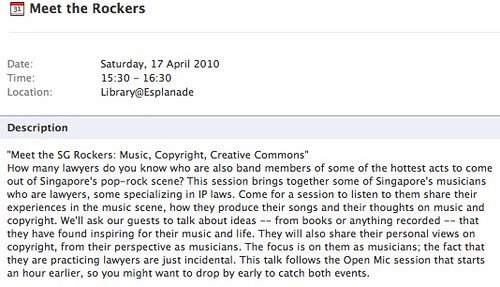
BTW, just to share how this event came about:
Some months ago, my colleagues and I were discussing about library events that we can organise as part of World Book Day and Copyright Day (many people don't know it's a UNESCO initiated event).
I remember thinking somewhere along the lines: Copyright, Creative Commons, Music.
Bounced some ideas off the Creative Commons Singapore discussion list (some helpful suggestions from there but nothing really concrete).
Then I thought of a contact, whom I knew was a rocker and a lawyer, though not specialising in IP law. And I emailed her (yeah, female rocker and practices law... don't play play ah!)
Asked if she would be interested in helping the library as a guest speaker. She replied yes almost immediately and even suggested a few other possible guests.
So come Saturday, 17th Apr 2010, meet: Linda Ong & Eng Teck (Lunarin), Kevin Mathews (Watchmen, The Crowd, Popland) and Daniel Sassoon (Livonia, Electrico).
No prizes for who my contact was :)
Thanks folks, for helping and supporting the public library.
[update: This librarian met these SG Rockers]
Here's one of particular interest to me:
"Meet the SG Rockers: Music, Copyright, Creative Commons"
Date: Saturday, 17 April 2010
Time: 15:30 - 16:30
Location: Library@Esplanade
How many lawyers do you know who are also band members of some of the hottest acts to come out of Singapore's pop-rock scene? This session brings together some of Singapore's musicians who are lawyers, some specializing in IP laws.
Come for a session to listen to them share their experiences in the music scene, how they produce their songs and their thoughts on music and copyright. We'll ask our guests to talk about ideas -- from books or anything recorded -- that they have found inspiring for their music and life.
They will also share their personal views on copyright, from their perspective as musicians. The focus is on them as musicians; the fact that they are practicing lawyers are just incidental.
This talk follows the Open Mic session that starts an hour earlier, so you might want to drop by early to catch both events.
Facebook event page, here (courtesy of Lunarin)
BTW, just to share how this event came about:
Some months ago, my colleagues and I were discussing about library events that we can organise as part of World Book Day and Copyright Day (many people don't know it's a UNESCO initiated event).
I remember thinking somewhere along the lines: Copyright, Creative Commons, Music.
Bounced some ideas off the Creative Commons Singapore discussion list (some helpful suggestions from there but nothing really concrete).
Then I thought of a contact, whom I knew was a rocker and a lawyer, though not specialising in IP law. And I emailed her (yeah, female rocker and practices law... don't play play ah!)
Asked if she would be interested in helping the library as a guest speaker. She replied yes almost immediately and even suggested a few other possible guests.
So come Saturday, 17th Apr 2010, meet: Linda Ong & Eng Teck (Lunarin), Kevin Mathews (Watchmen, The Crowd, Popland) and Daniel Sassoon (Livonia, Electrico).
No prizes for who my contact was :)
Thanks folks, for helping and supporting the public library.
[update: This librarian met these SG Rockers]
Wednesday, April 07, 2010
The Creative Crew April 2010 Meetup
I'll be speaking at the Apr 2010 Creative Crew meetup (13 Apr, Tampines Regional Library).
Specifically, I'm presenting a 30min segment on how "non-musicians" can use GarageBand to create tracks (write-up below, in bold). Will be referring to resource sites like ccMixter and FreeSound. And make reference to Creative Commons of course.

Incidentally, the Public Libraries has been hosting the Creative Crew meetups since Mar 2009. I'm happy to say that the collaboration is still going strong. And starting this year, the folks at Creative Crew agreed to feature musical-related segments. Which is why I'm in there. We'll also be working towards a Creative Commons project (more on that, later).
Here's an online resource list prepared for the Mar meetup, which is still relevant for Apr.
And here's the Apr programme:
Specifically, I'm presenting a 30min segment on how "non-musicians" can use GarageBand to create tracks (write-up below, in bold). Will be referring to resource sites like ccMixter and FreeSound. And make reference to Creative Commons of course.
Incidentally, the Public Libraries has been hosting the Creative Crew meetups since Mar 2009. I'm happy to say that the collaboration is still going strong. And starting this year, the folks at Creative Crew agreed to feature musical-related segments. Which is why I'm in there. We'll also be working towards a Creative Commons project (more on that, later).
Here's an online resource list prepared for the Mar meetup, which is still relevant for Apr.
And here's the Apr programme:
Date/Time: 13 April 2010 (Tuesday), 6.45-8.45pm.
Venue: Tampines Regional Library, 31, Tampines Ave 7 Singapore 529620
Nearest MRT Station: Tampines
Tampines Buses : SBS Transit 8, 15, 18, 19, 27, 28, 29, 37, 38, 81, 168, 291, 293
Programme Details
6.45PM – Registration
7.00PM – Professional photo retouching by Stefano Virgilli
Stefano retouched the pictures of well known Italian photographers from 2002 to 2006. Last month he showcased the High Pass sharpening trick. This month, he will focus on other amazing retouching techniques, allowing the model to look younger and fresher while retaining her natural look as much as possible.
7.30PM – Creating music for beginners by Ivan Chew
Ivan Chew, a Garageband and DIY music enthusiast, will share how “non-musicians” can use Apple’s GarageBand software and Creative Commons licensed music samples to create soundtracks — instrumentals or vocal pieces — for videos and slideshows. By non-musicians, it means you don’t have to know how to play any instruments or sing to win Singapore Idol. All you need is GarageBand (which comes with your Mac), an ability to count (if you can count, you can keep in tune), and a connection to the Internet (to search and download free and legal music samples).
8.00PM – BREAK
8.15PM – Finally CS5! by Stefano Virgilli
Synopsis > Beta tester Stefano Virgilli will showcase some of the most
impressive new tools in Adobe Photoshop CS5! Do not miss it
8.45PM – END
Friday, April 02, 2010
Detecting suspicious Gmail account activity (or, "Digital Literacy & Roles of Public Libraries")
If you use Gmail on a regular basis, then you might want to read these two posts from the official Gmail Blog:
The posts elaborates on the measures that Gmail has introduced, with the lastest (i.e. Mar 2010) being an audit trial of when and where your account was accessed, as well as an automated checking/ warning feature.
Both features are useful, particularly for those who access Gmail from shared computers and/ or public terminals.
HOW MOST EMAIL ACCOUNTS MAY HAVED BEEN "HACKED"
In most cases, I suspect most email accounts get "hacked" not from deliberate attempts to crack into individuals' account, but from the carelessness/ lack of knowledge by the owners when they use a shared computer -- in school, cybercafe, a friend who also has many other friends using the terminal. Like this:
No security feature is foolproof. It's just a matter of reducing the chances of the user making a mistake, or giving potential malicious hackers a harder time.
A feature like auto sign-out would help reduce the chances of someone stumbling onto your account, if you didn't log out. But potentially, if someone plonks right onto your vacated computer mere seconds after you leave, the auto sign-out feature may not have kicked in.
And the alerts are merely that -- an alert, as mentioned in the Gmail blog post:
Personally, I try to follow these practices if I use any computer that isn't my own:
CYBER-SAFETY, DIGITAL LITERACY & ROLE OF PUBLIC LIBRARIES
I definitely think Cybersafety should be part of a Digital Literacy curriculum. And that public libraries (hence, public librarians) are well placed to be those that help deliver Cybersafety and Digital Literacy awareness -- either by inviting outside speakers or developing our own credibility/ expertise to conduct such sessions.
For every child and adult who've been exposed to cybersafety talks (e.g. schools, computer classes for seniors), I'm sure there are still many who have not. The topic is also quite broad, so chances are not everything can be covered.
Plus, people forget. Or they don't instantly make the connection with what they have been warned earlier.
Such cybersafety talks don't have to be be long drawn sessions. I imagine them as 10-minute teasers. Or just short on-the-spot presentations (to target the incidental library visitor), like how some retail outlets employ retail assistants to conduct quick demos.
It just so happens that the product the librarian is trying to "sell" is Cybersafety and Digital Literacy.
- Detecting suspicious account activity (March 24, 2010) by Pavni Diwanji, Engineering Director
- Remote sign out and info to help you protect your Gmail account (July 07, 2008) by Erwin D'Souza, Gmail Engineer
The posts elaborates on the measures that Gmail has introduced, with the lastest (i.e. Mar 2010) being an audit trial of when and where your account was accessed, as well as an automated checking/ warning feature.
Both features are useful, particularly for those who access Gmail from shared computers and/ or public terminals.
HOW MOST EMAIL ACCOUNTS MAY HAVED BEEN "HACKED"
In most cases, I suspect most email accounts get "hacked" not from deliberate attempts to crack into individuals' account, but from the carelessness/ lack of knowledge by the owners when they use a shared computer -- in school, cybercafe, a friend who also has many other friends using the terminal. Like this:
- You go to your email sign-in page, checked the "Stay Signed-In" option before you log into Gmail.
- You log into your email account, do what you have to do, and then close the browser. But you didn't sign out from your account.
- You leave the computer.
- A stranger pops by and uses the same computer. Goes to the same email sign-in page.
- If you have checked the "Stay signed-in" option and you didn't sign out, then your email account opens up right away. Because the computer was told to stay signed-in. already signedinthe computer doesn't know or care who is accessing the information.
No security feature is foolproof. It's just a matter of reducing the chances of the user making a mistake, or giving potential malicious hackers a harder time.
A feature like auto sign-out would help reduce the chances of someone stumbling onto your account, if you didn't log out. But potentially, if someone plonks right onto your vacated computer mere seconds after you leave, the auto sign-out feature may not have kicked in.
And the alerts are merely that -- an alert, as mentioned in the Gmail blog post:
"Keep in mind that these notifications are meant to alert you of suspicious activity but are not a replacement for account security best practices. "[The same blog post has links to online security tips and best-practices]
Personally, I try to follow these practices if I use any computer that isn't my own:
- Avoid using shared terminals if I can wait. And in most cases, things can wait. I'd rather not check my emails or access my Twitter or Facebook account, if I have to use a shared terminal. I'd rather get home to access my accounts if I can wait).
- Empty the browser cache/ history/ Saved Passwords before shutting down/ leaving the computer (although this becomes a problem when I use a computer in a foreign country, and where the native language isn't English).
- Always Remember Rule #1.
CYBER-SAFETY, DIGITAL LITERACY & ROLE OF PUBLIC LIBRARIES
I definitely think Cybersafety should be part of a Digital Literacy curriculum. And that public libraries (hence, public librarians) are well placed to be those that help deliver Cybersafety and Digital Literacy awareness -- either by inviting outside speakers or developing our own credibility/ expertise to conduct such sessions.
For every child and adult who've been exposed to cybersafety talks (e.g. schools, computer classes for seniors), I'm sure there are still many who have not. The topic is also quite broad, so chances are not everything can be covered.
Plus, people forget. Or they don't instantly make the connection with what they have been warned earlier.
Such cybersafety talks don't have to be be long drawn sessions. I imagine them as 10-minute teasers. Or just short on-the-spot presentations (to target the incidental library visitor), like how some retail outlets employ retail assistants to conduct quick demos.
It just so happens that the product the librarian is trying to "sell" is Cybersafety and Digital Literacy.
Tuesday, March 16, 2010
Ask this librarian: For art and music
I was just trying to be cheeky for the title.
You know, ask a librarian. Asking this particular one (i.e. me) not about music or art but FOR them.
ART and the Art of Asking
A few days ago, a 15 year-old student (he was Singaporean but was studying overseas) asked if I could send him some higher-res images of a series of illustrations I created for the re-opening of Bukit Merah Public Library (it was referred as a Community Library then, when I was still managing it).
Hint: If you want a favourable response from people (from me at least), ask politely. And it helps if you volunteer more information on the Whys and Hows (i.e. be specific).
Which he clearly did.
And later, when I asked for more information about the school event he mentioned, he also added how he intended to protect my intellectual property rights: adding a watermark each image, destroying the printed images, making sure it's not disposed in a public trash bin even, and to delete from his computer.
I wrote back to say he didn’t have to do all that. Mentioned about my adoption of Creative Commons license. He could use the images as he deem fit, as long as he credited them in the way I wanted.

As I replied to him, I realised I did not make the higher-res images available online (it was before I discovered Creative Commons).
So here they are, posted at my Flickr account, if any one is interested. Instructions on how to credit them are stated at the individual Flickr post.
MUSIC
And just a few weeks earlier, another student (not a Singaporean, and not in Singapore) emailed to ask if I was willing to help her team with a soundtrack for their film project.
She was a film student working on a film project about Chinese culture and Mahjong. She found my Erhu twilight sample track from ccMixter.org, felt it would be appropriate for her film, but needed someone to create a longer track.
This was more challenging that the art work, 'cos I had to create the track almost from scratch.
I decided to do it because I had the time, and it every musical challenge was a learning experience.
More important, the student was polite in her mails and was clear on what she requested (you spot the pattern here?).
Took about two hours and came up with the following:
It's all CC-BY licensed. Information on how to credit the tracks, here.
Two days ago, she replied.
They didn't use my track. Not that they had to, but of course I'd hoped they would.
She explained that according to their marking criteria, if they used music that wasn't their original composition, they risked getting a zero for parts of their assessment. Meaning, their overall score would not be as high and they wouldn't get top marks.
She also apologised for not using the music, thanked me again, and said they should have reviewed their marking criteria fully before asking me to compose the track.
Far from being upset, I was happy they completed their film. I'd be 'upset' if I didn't hear from her (she could've just kept mum and not tell me).
I was also happy to learn that they eventually managed to find someone to teach them a little about percussion instruments. They used their new-found skills to create the sound effects for their film.
Speaking of which, do check out their film on YouTube:
IF YOU WANNA HELP, JUST HELP
When I related both cases to a friend, he asked me, "Aren't you worried you're being taken for a ride?"
He felt there was no guarantee that my efforts would result it my works being used. And even if they did credit my work the way I wanted, that may do nothing to publicise my work (the attention was on their own works).
At that time, I just shrugged and said "Maybe" and "Who knows?"
Later on my way home, I reflected on my friend's question and comment. Certainly, those concerns occurred to me. They always did. I tend to expect the worse, in fact.
But I agreed to those requests, knowing full well of possible 'unintended consequences'.
Because I wanted to.
Especially when people asked nicely.
You know, ask a librarian. Asking this particular one (i.e. me) not about music or art but FOR them.
ART and the Art of Asking
A few days ago, a 15 year-old student (he was Singaporean but was studying overseas) asked if I could send him some higher-res images of a series of illustrations I created for the re-opening of Bukit Merah Public Library (it was referred as a Community Library then, when I was still managing it).
Hint: If you want a favourable response from people (from me at least), ask politely. And it helps if you volunteer more information on the Whys and Hows (i.e. be specific).
Which he clearly did.
And later, when I asked for more information about the school event he mentioned, he also added how he intended to protect my intellectual property rights: adding a watermark each image, destroying the printed images, making sure it's not disposed in a public trash bin even, and to delete from his computer.
I wrote back to say he didn’t have to do all that. Mentioned about my adoption of Creative Commons license. He could use the images as he deem fit, as long as he credited them in the way I wanted.
As I replied to him, I realised I did not make the higher-res images available online (it was before I discovered Creative Commons).
So here they are, posted at my Flickr account, if any one is interested. Instructions on how to credit them are stated at the individual Flickr post.
MUSIC
And just a few weeks earlier, another student (not a Singaporean, and not in Singapore) emailed to ask if I was willing to help her team with a soundtrack for their film project.
She was a film student working on a film project about Chinese culture and Mahjong. She found my Erhu twilight sample track from ccMixter.org, felt it would be appropriate for her film, but needed someone to create a longer track.
This was more challenging that the art work, 'cos I had to create the track almost from scratch.
I decided to do it because I had the time, and it every musical challenge was a learning experience.
More important, the student was polite in her mails and was clear on what she requested (you spot the pattern here?).
Took about two hours and came up with the following:
It's all CC-BY licensed. Information on how to credit the tracks, here.
Two days ago, she replied.
They didn't use my track. Not that they had to, but of course I'd hoped they would.
She explained that according to their marking criteria, if they used music that wasn't their original composition, they risked getting a zero for parts of their assessment. Meaning, their overall score would not be as high and they wouldn't get top marks.
She also apologised for not using the music, thanked me again, and said they should have reviewed their marking criteria fully before asking me to compose the track.
Far from being upset, I was happy they completed their film. I'd be 'upset' if I didn't hear from her (she could've just kept mum and not tell me).
I was also happy to learn that they eventually managed to find someone to teach them a little about percussion instruments. They used their new-found skills to create the sound effects for their film.
Speaking of which, do check out their film on YouTube:
IF YOU WANNA HELP, JUST HELP
When I related both cases to a friend, he asked me, "Aren't you worried you're being taken for a ride?"
He felt there was no guarantee that my efforts would result it my works being used. And even if they did credit my work the way I wanted, that may do nothing to publicise my work (the attention was on their own works).
At that time, I just shrugged and said "Maybe" and "Who knows?"
Later on my way home, I reflected on my friend's question and comment. Certainly, those concerns occurred to me. They always did. I tend to expect the worse, in fact.
But I agreed to those requests, knowing full well of possible 'unintended consequences'.
Because I wanted to.
Especially when people asked nicely.
Monday, March 08, 2010
eBooks for Public Libraries: Is the current business model sustainable?
In my previous post, I questioned if the whole eBook business model -- where public libraries are customers -- was sustainable.
I offer no answers nor earth-shaking mind-bending insights; only opinions :)
In essence, I suggest it's a question of managing costs.
First, what is the current business model where eBooks and public libraries are concerned?
Basically it works like this: The public library enters into a contract with an 'eBook vendor'. The contract is usually a license, where the vendor allows the public library to access the vendor's eBooks. The public library pays the vendor a fee, and there may be other technical restrictions for access (e.g. IP address, number of concurrent access).
Depending on the vendor's delivery platform, the eBooks may or may not be able to be downloaded to an eBook reader. The license fee has to be renewed at the end of the contractual term (meaning, access is terminated if there's no payment).
Why I feel there may be problems with the current eBook business model for public libraries
The main reason is that in the current eBook supply model, public libraries don't own the eBook copy (unlike the case for print books). The First-sale Doctrine does not apply.
Public libraries don't buy eBooks, not in the sense of owning then. In truth, public libraries pay a fee which we're able to pass on the right of access to our members.
Or to put in another way, public libraries are paying (on behalf of its members) for the convenience of accessing e-versions of the book.
The eBook vendors also impose a limit to the number of digital copies. I'm not privy to NLB's or any other libraries' contracts with their respective eBook vendors. But from the access policies, it's clear to me most eBook vendors do not allow unlimited access. Which means if the public library wants to obtain more digital copies, they need to pay more.
In short, it's about cost.
Costs of use of eBooks goes up rather than down
The more our users demand for eBooks, it's likely the cost will probably go up rather than come down.
It's simple math:
Let say the printed book (pBook) costs $10 and the eBook costs $2, or 5 times cheaper than pBook (in most cases, e-versions cost less than the paper versions).
Although the pBook is physical while the eBook is in bits and bytes, the eBook vendor isn't going to allow the library to make infinite copies. So the eBook is really a digital item treated and handled like a physical object, limiting its access.
And let's assume the pBook is loaned out for an average period of 10 days. Same as eBook (remember, the vendor forces the library to treat the eBook like a pbook).
In 300 days, both the pBook and eBook will circulate 30 times. The cost per pBook is $0.33 while the eBook is $0.06.
The eBook is cheaper, you say?
Ah, but the library owns the pBook and is free to let it circulate for another year. Or make it two more before it deems the pBook too worn to be kept. The pBook would have circulated 90 times. Or it costs $0.03 per loan.
The ebook, on the other hand, would have cost a total of $6 over three years (the public library has to keep paying the vendor each year, remember?). That will mean its cost per loan has increased to $0.07.
Plus we've not considered that users have to buy their own reader. I'm an optimist but even then I don't think it's possible for the public library to provide eBook readers for every of its members.
This means the eBook circulation is likely to be even less than the pBook. For a popular title, the pBook is definitely going to cost less.
eBooks are a cost-item, not an asset
For pBooks, it's an asset item whose cost of investment is amortised over time and with use. For eBooks, given the current business model, public libraries can only treat it as a cost item.
On the balance sheet it is a liability rather than an asset.
Time out...
Of course there are problems with my simple explanation above. Not all pBooks enjoy full circulation anyway. I've also neglected physical storage costs, or inventory holding costs.
Ah, but in reality, public libraries make do with their existing space (that's why we 'weed' collections to make room). This means the infrastructure cost for physical storage is amortised and again you have decreasing costs over time. In fact, the annual reports and financial statements of most -- if not all -- public libraries show that the largest chunk of the operational costs are staffing rather than assets.
All things equal, the eBook will cost the library more to provide compared to pBooks.
A different (cheaper) eBook business model for public libraries?
One of my colleague likes to say that the current reality for public libraries all over the world is a shrinking budget. I agree. Even for Singapore, that will be true.
Yet another reality is that the number of public library members -- who find the eBook format attractive -- will increase. More readers will expect the public library to provide eBooks (I'm not talking about replacement of pBooks, but the demand for eBooks).
But what then, would be that different business model for public libraries? The eBook vendor will charge a lump sum access fee, and allow unlimited copies for the year? Or allow buyers of eBooks to donate their eBook copy to the public library?
And still ensure that the eBook vendor/ publisher/ author still maintains a profit?
Or could public library members, who wish to have that added convenience of eBooks, share part of the costs? Where they pay just a little bit, as a premium service. That's possible if we view eBooks as an alternative format to print.
A question of balance
In the longer term, my bet is that eBooks will be more expensive than print, where public libraries are concerned. There are some who say the cost of eBooks are understated as it is.
Public libraries will have to calculate the total cost of service provision, and ensure that there's a balance between cost expenditure and asset investment.
A company like Apple, whose customer base is global, has the clout to force book sellers to lower prices. Public libraries don't. So the only way is to manage our own costs in view with our customers' use, demand and expectations of our collections and services.
A question of public commitment
When Andrew Carnegie set up a foundation to help establish public libraries, one requirement was that the people and government had to be willing to fund part of the operating costs.
His foundation's initial investment would have covered the building and the collections. The library owned the books and was free to lend them out as many times as people would want to borrow. There was no burden on him to constantly feed money into this black hole called a public library.
However, suppose Andrew Carnegie was told that his one-time donation was good only for one year. After that he would need to continue paying the eBook vendor to enable access to the eBooks. The more people used his library each year, the bigger the hole it burns in his pocket.
I bet Andrew Carnegie would think twice about setting up the public library in the first place.
I offer no answers nor earth-shaking mind-bending insights; only opinions :)
In essence, I suggest it's a question of managing costs.
First, what is the current business model where eBooks and public libraries are concerned?
Basically it works like this: The public library enters into a contract with an 'eBook vendor'. The contract is usually a license, where the vendor allows the public library to access the vendor's eBooks. The public library pays the vendor a fee, and there may be other technical restrictions for access (e.g. IP address, number of concurrent access).
Depending on the vendor's delivery platform, the eBooks may or may not be able to be downloaded to an eBook reader. The license fee has to be renewed at the end of the contractual term (meaning, access is terminated if there's no payment).
Why I feel there may be problems with the current eBook business model for public libraries
The main reason is that in the current eBook supply model, public libraries don't own the eBook copy (unlike the case for print books). The First-sale Doctrine does not apply.
Public libraries don't buy eBooks, not in the sense of owning then. In truth, public libraries pay a fee which we're able to pass on the right of access to our members.
Or to put in another way, public libraries are paying (on behalf of its members) for the convenience of accessing e-versions of the book.
The eBook vendors also impose a limit to the number of digital copies. I'm not privy to NLB's or any other libraries' contracts with their respective eBook vendors. But from the access policies, it's clear to me most eBook vendors do not allow unlimited access. Which means if the public library wants to obtain more digital copies, they need to pay more.
In short, it's about cost.
Costs of use of eBooks goes up rather than down
The more our users demand for eBooks, it's likely the cost will probably go up rather than come down.
It's simple math:
Let say the printed book (pBook) costs $10 and the eBook costs $2, or 5 times cheaper than pBook (in most cases, e-versions cost less than the paper versions).
Although the pBook is physical while the eBook is in bits and bytes, the eBook vendor isn't going to allow the library to make infinite copies. So the eBook is really a digital item treated and handled like a physical object, limiting its access.
And let's assume the pBook is loaned out for an average period of 10 days. Same as eBook (remember, the vendor forces the library to treat the eBook like a pbook).
In 300 days, both the pBook and eBook will circulate 30 times. The cost per pBook is $0.33 while the eBook is $0.06.
The eBook is cheaper, you say?
Ah, but the library owns the pBook and is free to let it circulate for another year. Or make it two more before it deems the pBook too worn to be kept. The pBook would have circulated 90 times. Or it costs $0.03 per loan.
The ebook, on the other hand, would have cost a total of $6 over three years (the public library has to keep paying the vendor each year, remember?). That will mean its cost per loan has increased to $0.07.
Plus we've not considered that users have to buy their own reader. I'm an optimist but even then I don't think it's possible for the public library to provide eBook readers for every of its members.
This means the eBook circulation is likely to be even less than the pBook. For a popular title, the pBook is definitely going to cost less.
eBooks are a cost-item, not an asset
For pBooks, it's an asset item whose cost of investment is amortised over time and with use. For eBooks, given the current business model, public libraries can only treat it as a cost item.
On the balance sheet it is a liability rather than an asset.
Time out...
Of course there are problems with my simple explanation above. Not all pBooks enjoy full circulation anyway. I've also neglected physical storage costs, or inventory holding costs.
Ah, but in reality, public libraries make do with their existing space (that's why we 'weed' collections to make room). This means the infrastructure cost for physical storage is amortised and again you have decreasing costs over time. In fact, the annual reports and financial statements of most -- if not all -- public libraries show that the largest chunk of the operational costs are staffing rather than assets.
All things equal, the eBook will cost the library more to provide compared to pBooks.
A different (cheaper) eBook business model for public libraries?
One of my colleague likes to say that the current reality for public libraries all over the world is a shrinking budget. I agree. Even for Singapore, that will be true.
Yet another reality is that the number of public library members -- who find the eBook format attractive -- will increase. More readers will expect the public library to provide eBooks (I'm not talking about replacement of pBooks, but the demand for eBooks).
But what then, would be that different business model for public libraries? The eBook vendor will charge a lump sum access fee, and allow unlimited copies for the year? Or allow buyers of eBooks to donate their eBook copy to the public library?
And still ensure that the eBook vendor/ publisher/ author still maintains a profit?
Or could public library members, who wish to have that added convenience of eBooks, share part of the costs? Where they pay just a little bit, as a premium service. That's possible if we view eBooks as an alternative format to print.
A question of balance
In the longer term, my bet is that eBooks will be more expensive than print, where public libraries are concerned. There are some who say the cost of eBooks are understated as it is.
Public libraries will have to calculate the total cost of service provision, and ensure that there's a balance between cost expenditure and asset investment.
A company like Apple, whose customer base is global, has the clout to force book sellers to lower prices. Public libraries don't. So the only way is to manage our own costs in view with our customers' use, demand and expectations of our collections and services.
A question of public commitment
When Andrew Carnegie set up a foundation to help establish public libraries, one requirement was that the people and government had to be willing to fund part of the operating costs.
His foundation's initial investment would have covered the building and the collections. The library owned the books and was free to lend them out as many times as people would want to borrow. There was no burden on him to constantly feed money into this black hole called a public library.
However, suppose Andrew Carnegie was told that his one-time donation was good only for one year. After that he would need to continue paying the eBook vendor to enable access to the eBooks. The more people used his library each year, the bigger the hole it burns in his pocket.
I bet Andrew Carnegie would think twice about setting up the public library in the first place.
Sunday, February 28, 2010
My (outside US) Kindle experience
Back in Nov last year, a colleague lent me his Kindle for a testdrive (I'm not sure if the features have changed/ improved since then).
Overall verdict:
That said, here's my rambly review (btw, you may find my review contradicting what I wrote about making comparisons, but I'm "comparing" more as a benchmark for explanatory purposes):
INITIAL IMPRESSIONS
My first thoughts were: "Sleek and stylish; makes you want to pick it up and just... use it!"
The whole thing just felt right in my hands. Here's how it looks like in its synthetic leather cover:

This was how it looked like without the leather cover (I placed a pen on it so that you get a sense of its dimensions)

It's really thin and light. The size difference is even more apparent when placed next to a hardcover book (incidentally the hardcover book was titled "The Shock of the Old", heh).

USABILITY
I could operate it with familiarity within 5 minutes of fiddling with the buttons, and without referring to any user manual or asking anyone else. It was like learning how to operate a mobile phone -- just fiddling and by trial and error. The Kindle wasn't going to crash just because you pressed the wrong buttons, so that was its plus point.

Its black-on-grey screen display was easy to read. If an eBook was interesting enough, I could read it through without tiring my eyes. You can also change the text font size, so that helps for prolonged reading.
I could hold the Kindle with one hand and press the "next page" and "previous page" buttons. Together with its light weight, its very handy for reading while traveling on MRT trains (you'll appreciate that if you've attempted to read/ flip the pages of a print book, in a crowded train, while trying to grab hold of support).
The built-in dictionary was really handy. Typing on the keys activated the dictionary.
When you return to the eBook, it automatically went to the last page location when you left the ebook. Like an automatic bookmark.
Battery life was excellent. I charged it once and it lasted for a month easily (I didn't read it everyday though).
MORE ON KINDLE'S FEATURES
There's a text-to-speech feature. Turns your book into a hands-free set. However, after a while I couldn't stand the computer narration and went back to sight-reading (it could just be me).
I also wondered how easy it would be for a Blind person to activate the speech mode. I mean, if you couldn't visually navigate to get to the buttons, then how does one turn it on/ off in the first place? Well, maybe a Blind person would memorise the button sequence.
There's a nifty "note taking" feature. At the 'pages' where I wish to record some notes or thoughts, I simply called up the notetaking feature and typed in the text with the hard buttons.
But the downside was that the recorded notes could only be retrieved for that specific ebook title/ e-copy. Meaning, there wasn't a way to read all recorded notes from the main menu (unlike a true notepad application). You'd have a problem if you wanted to retrieve an earlier note but you couldn't remember which eBook title it was when you typed it in.
You also couldn't export the notes.
So the Kindle wasn't designed as a notepad per se, but more for individual eBook titles to be read (the note-taking was incidental and designed around the individual eBook titles).
A KINDLE ISN'T AN eBOOK-READER PER SE
Think of the Kindle as more of "a device to read Amazon.com's eBook titles". According to the instructions, Amazon.com will "convert the document into Kindle format and wirelessly deliver to your kindle for a small fee or back to your computer for free."
Of course, you could download free eBooks from sites like www.freekindlebooks.org, where they offer free ebooks in Kindle compatible formats. Or if you come across authors like Cory Doctorow.
But quite honestly, the general selection of free books -- even from Amazon -- were boring stuff (except for Cory Doctorow's work, but he's more of an exception).
In short, I wouldn't have borrowed those free stuff in the first place, even if they were available in the public library, let alone buy them.
WHAT I DIDN'T GET USED TO
Using the Kindle lacked the experience of physically browsing and turning a print book. Not that I need to feel paper per se, but I realised a print book allowed me to do a very fast -- albeit hit-and-miss approach -- browse of the contents by flipping and stopping at random sections.
With the Kindle, you needed to know the specific page numbers in order to jump ahead the pages. The page number system wasn't intuitive to me. E.g. an eBook could start with a first page like "Locations 19-23", then the very next page was "Locations 23-30", and then next "Locations 30-37". Maybe there was a pattern to it, but I'm the sort who do badly at IQ tests. Then again, you shouldn't be a genius to use a Kindle...
Oh yeah, it came a point when I needed to charge the Kindle. But as I mentioned at the start of the post, it shouldn't be a case of eBook device Vs. Print Book (like how we don't complain about charging our mobile phone Vs. talking face-to-face with a friend -- if you can reach them in person).
Anyway, the battery charge lasts quite a long time. No complaints from me for that aspect.

LACK OF VISUAL CUES
Many times in using the kindle, I was reminded at how it lacked the visual and physical navigation that I took for granted with a print book.
The horizontal bar gives a visual clue how much of the book has been completed and how much is left. But you don't get any other visual cues of the thickness of the book, because the horizontal line is the same length for a 10 page book and a 100 page volume.
Flipping physical pages was still the most efficient way to browse a book, I thought. At least, when you didn't need to look for something specific. With a physical book I can jump very quickly to the middle or end parts of the book.
With a Kindle, there was only the "Go to Beginning" and "Go to Location" options from the menu. The horizontal bar might have given me a visual cue which point I was in the book, but to "get there" I had to press the forward/ backward buttons repeatedly.
THINK-ALOUD #1: JUST DIFFERENT READING EXPERIENCES
Personally, I don't get the "X-is-better-than-Y" argument about eBooks and print. Both reading formats should be appreciated for what they uniquely offer rather than whether one is better than the other. They both give different user-experiences.
THINK-ALOUD #2: IT'S MANY FACTORS WORKING IN CONCERT
eBooks have been around for years, but never got the buzz until Amazon's Kindle came along.
Until I tried the Kindle, I didn't think it would be feasible to read a book on an electronic device, for protracted periods. The Kindle isn't the only well-designed eBook reader out there. There's Bookeen, for instance. And of course the more well-known Sony reader.
However, I don't think all the buzz was just from one or two single factors like eBooks or the eBook reader (although they could be fairly important ones). In totality, it was probably a combination of range and choice of eBook titles, their affordability, a trusted brand/ store, a loyal and ready customer-base, online purchasing habits, a well-designed eBook reader...
All things considered, I suppose the Kindle was the tipping point.
Even Sony seems to know that it has got to offer both an ebookstore and a reading device.
THINK-ALOUD #3: IT'S STILL ABOUT GOOD READS
One other thing that was quickly apparent: a difficult (I choose not to use the word boring) book remains a difficult book. Regardless of whether you read it on a paper-based book or on a kindle.
At one point in my Kindle test drive, I had 92 books in it, including the Kindle compatible ones I downloaded.
But the only eBook that I read from beginning to end was Cory Doctorow's "I, Robot".
THINK-ALOUD #4: IT'S STILL PUBLIC LIBRARIES FOR ME, FOR FREE READS
I'm sure if I had purchased some good eBook titles (and I knew a few), my "cover-to-cover" completion rate would increase.
The Kindle is a device designed by Amazon.com, for the specific use of buying and reading eBooks from Amazon.com. I can attest that it's a great product. But after the initial novelty, the device became less important.
I wanted more of the good stuff.
Amazon.com has lots of good stuff. But I've never been one to buy books. I'm so used to just borrowing the good stuff from public libraries that I automatically close myself off any notion of buying books.
From that perspective, I suspect those who use public libraries will continue to do so. And those who buy books (electronic or print) will probably carry on and aren't that much of public library users.
Do I think public libraries should offer eBooks like how print is offered? Yes, for sure.
But whether it's a sustainable model, that's a whole other issue (and for another blog post). [update: I posted this in response to the sustainability issue].
Overall verdict:
- It was easy to learn how to use it.
- Handling the Kindle was easier in some ways but harder for some aspects.
- Whether something like the Kindle is "better than a print book" depends on what criteria we're using. And advantages/ disadvantages might be relative as well. E.g. if cost is the main consideration, I'd go for a pbook anytime. But even then, it's relative. If you regularly buy books, then the cost per book may be lowered as you purchase more eBooks and spread the fixed cost of the Kindle.
- Though one can't help compare it as an "eBook" Vs. a "pBook" (i.e. print book), I think both formats should be appreciated for what they uniquely offer rather than whether one is better than the other. They both give different user-experiences.
- Content is still king. Both the electronic and print book versions have inherent pros and cons, which affects the reading experience. But I can still never get through Tolstoy's War and Peace, regardless of "e" or "p" versions.
That said, here's my rambly review (btw, you may find my review contradicting what I wrote about making comparisons, but I'm "comparing" more as a benchmark for explanatory purposes):
INITIAL IMPRESSIONS
My first thoughts were: "Sleek and stylish; makes you want to pick it up and just... use it!"
The whole thing just felt right in my hands. Here's how it looks like in its synthetic leather cover:
This was how it looked like without the leather cover (I placed a pen on it so that you get a sense of its dimensions)
It's really thin and light. The size difference is even more apparent when placed next to a hardcover book (incidentally the hardcover book was titled "The Shock of the Old", heh).
USABILITY
I could operate it with familiarity within 5 minutes of fiddling with the buttons, and without referring to any user manual or asking anyone else. It was like learning how to operate a mobile phone -- just fiddling and by trial and error. The Kindle wasn't going to crash just because you pressed the wrong buttons, so that was its plus point.
Its black-on-grey screen display was easy to read. If an eBook was interesting enough, I could read it through without tiring my eyes. You can also change the text font size, so that helps for prolonged reading.
I could hold the Kindle with one hand and press the "next page" and "previous page" buttons. Together with its light weight, its very handy for reading while traveling on MRT trains (you'll appreciate that if you've attempted to read/ flip the pages of a print book, in a crowded train, while trying to grab hold of support).
The built-in dictionary was really handy. Typing on the keys activated the dictionary.
When you return to the eBook, it automatically went to the last page location when you left the ebook. Like an automatic bookmark.
Battery life was excellent. I charged it once and it lasted for a month easily (I didn't read it everyday though).
MORE ON KINDLE'S FEATURES
There's a text-to-speech feature. Turns your book into a hands-free set. However, after a while I couldn't stand the computer narration and went back to sight-reading (it could just be me).
I also wondered how easy it would be for a Blind person to activate the speech mode. I mean, if you couldn't visually navigate to get to the buttons, then how does one turn it on/ off in the first place? Well, maybe a Blind person would memorise the button sequence.
There's a nifty "note taking" feature. At the 'pages' where I wish to record some notes or thoughts, I simply called up the notetaking feature and typed in the text with the hard buttons.
But the downside was that the recorded notes could only be retrieved for that specific ebook title/ e-copy. Meaning, there wasn't a way to read all recorded notes from the main menu (unlike a true notepad application). You'd have a problem if you wanted to retrieve an earlier note but you couldn't remember which eBook title it was when you typed it in.
You also couldn't export the notes.
So the Kindle wasn't designed as a notepad per se, but more for individual eBook titles to be read (the note-taking was incidental and designed around the individual eBook titles).
A KINDLE ISN'T AN eBOOK-READER PER SE
Think of the Kindle as more of "a device to read Amazon.com's eBook titles". According to the instructions, Amazon.com will "convert the document into Kindle format and wirelessly deliver to your kindle for a small fee or back to your computer for free."
Of course, you could download free eBooks from sites like www.freekindlebooks.org, where they offer free ebooks in Kindle compatible formats. Or if you come across authors like Cory Doctorow.
But quite honestly, the general selection of free books -- even from Amazon -- were boring stuff (except for Cory Doctorow's work, but he's more of an exception).
In short, I wouldn't have borrowed those free stuff in the first place, even if they were available in the public library, let alone buy them.
WHAT I DIDN'T GET USED TO
Using the Kindle lacked the experience of physically browsing and turning a print book. Not that I need to feel paper per se, but I realised a print book allowed me to do a very fast -- albeit hit-and-miss approach -- browse of the contents by flipping and stopping at random sections.
With the Kindle, you needed to know the specific page numbers in order to jump ahead the pages. The page number system wasn't intuitive to me. E.g. an eBook could start with a first page like "Locations 19-23", then the very next page was "Locations 23-30", and then next "Locations 30-37". Maybe there was a pattern to it, but I'm the sort who do badly at IQ tests. Then again, you shouldn't be a genius to use a Kindle...
Oh yeah, it came a point when I needed to charge the Kindle. But as I mentioned at the start of the post, it shouldn't be a case of eBook device Vs. Print Book (like how we don't complain about charging our mobile phone Vs. talking face-to-face with a friend -- if you can reach them in person).
Anyway, the battery charge lasts quite a long time. No complaints from me for that aspect.
LACK OF VISUAL CUES
Many times in using the kindle, I was reminded at how it lacked the visual and physical navigation that I took for granted with a print book.
The horizontal bar gives a visual clue how much of the book has been completed and how much is left. But you don't get any other visual cues of the thickness of the book, because the horizontal line is the same length for a 10 page book and a 100 page volume.
Flipping physical pages was still the most efficient way to browse a book, I thought. At least, when you didn't need to look for something specific. With a physical book I can jump very quickly to the middle or end parts of the book.
With a Kindle, there was only the "Go to Beginning" and "Go to Location" options from the menu. The horizontal bar might have given me a visual cue which point I was in the book, but to "get there" I had to press the forward/ backward buttons repeatedly.
THINK-ALOUD #1: JUST DIFFERENT READING EXPERIENCES
Personally, I don't get the "X-is-better-than-Y" argument about eBooks and print. Both reading formats should be appreciated for what they uniquely offer rather than whether one is better than the other. They both give different user-experiences.
THINK-ALOUD #2: IT'S MANY FACTORS WORKING IN CONCERT
eBooks have been around for years, but never got the buzz until Amazon's Kindle came along.
Until I tried the Kindle, I didn't think it would be feasible to read a book on an electronic device, for protracted periods. The Kindle isn't the only well-designed eBook reader out there. There's Bookeen, for instance. And of course the more well-known Sony reader.
However, I don't think all the buzz was just from one or two single factors like eBooks or the eBook reader (although they could be fairly important ones). In totality, it was probably a combination of range and choice of eBook titles, their affordability, a trusted brand/ store, a loyal and ready customer-base, online purchasing habits, a well-designed eBook reader...
All things considered, I suppose the Kindle was the tipping point.
Even Sony seems to know that it has got to offer both an ebookstore and a reading device.
THINK-ALOUD #3: IT'S STILL ABOUT GOOD READS
One other thing that was quickly apparent: a difficult (I choose not to use the word boring) book remains a difficult book. Regardless of whether you read it on a paper-based book or on a kindle.
At one point in my Kindle test drive, I had 92 books in it, including the Kindle compatible ones I downloaded.
But the only eBook that I read from beginning to end was Cory Doctorow's "I, Robot".
THINK-ALOUD #4: IT'S STILL PUBLIC LIBRARIES FOR ME, FOR FREE READS
I'm sure if I had purchased some good eBook titles (and I knew a few), my "cover-to-cover" completion rate would increase.
The Kindle is a device designed by Amazon.com, for the specific use of buying and reading eBooks from Amazon.com. I can attest that it's a great product. But after the initial novelty, the device became less important.
I wanted more of the good stuff.
Amazon.com has lots of good stuff. But I've never been one to buy books. I'm so used to just borrowing the good stuff from public libraries that I automatically close myself off any notion of buying books.
From that perspective, I suspect those who use public libraries will continue to do so. And those who buy books (electronic or print) will probably carry on and aren't that much of public library users.
Do I think public libraries should offer eBooks like how print is offered? Yes, for sure.
But whether it's a sustainable model, that's a whole other issue (and for another blog post). [update: I posted this in response to the sustainability issue].
Tuesday, February 23, 2010
CC resource: Learning Music Monthly website
I learned about this website called "Learning Music Monthly" - LMM - (learningmusicmonthly.com):

At the bottom of the page, it says:
According to this Creative Commons' tweet, the LMM site has been revamped. Not sure how it was like before but the current look and feel is really clean, intuitive and easy to navigate.
When I visited the site, there were two seasons (i.e. 2 x 12 months) of albums posted. Each of the graphic bar represents an album.

Clicking any bar would drop down the individual album playlist.

There's a "read liner notes" link, which will pop up more information about the album. The illustrator is credited in the liner note section.

The one-album-a-month part is clear. I'm not that sure about the "learning" aspect though. The word learning made me expect that each album artist would share more insights on how they created their works. But most liner notes didn't go beyond listing the creators.
But it's a great initiative, nonetheless. I'm not complaining or criticising.
A Singapore version?
Suppose there was a Singapore equivalent of the LMM site, where there's a new track shared online monthly. Or a video (not limited to music). One of the requirement would be for the creator to provide information on the creative process. Could be a simple form to fill up, as a guide. And in the spirit of learning and sharing, the content would be licensed under Creative Commons.
The main recurrent cost for such a site would be the hosting bills. Well, the alternative would be to upload the audio/ videos to Archive.org -- it's their mandate anyway. Then one has only to link to/ stream from the host site.
Actually the maintenance cost isn't the biggest challenge. What's harder, I think, is in getting regular contributors for such a site. And getting them to understand and agree to releasing their works under a Creative Commons license.
Wonder what our own National Arts Council (NAC) and Media Development Authority (MDA) would make of a site like LMM. Would they see such a website as part of what they want to promote with regards to media and arts in Singapore?
"Learning Music Monthly is an album-a-month project. Each season of LMM lasts for twelve months and includes twelve issues. Every album features artwork by a different visual artist, and is released under a Creative Commons license.
Every album from the series is available on this website for free stream or download. If you like what you hear, you can help us continue improving the project by making a small donation or purchasing a subscription to receive limited-edition, hand-made CDs every month in your mailbox."
At the bottom of the page, it says:
"All downloads are offered under a Creative Commons BY-NC-SA license. You are encouraged to share and remix as long as you give credit."
According to this Creative Commons' tweet, the LMM site has been revamped. Not sure how it was like before but the current look and feel is really clean, intuitive and easy to navigate.
When I visited the site, there were two seasons (i.e. 2 x 12 months) of albums posted. Each of the graphic bar represents an album.
Clicking any bar would drop down the individual album playlist.
There's a "read liner notes" link, which will pop up more information about the album. The illustrator is credited in the liner note section.
The one-album-a-month part is clear. I'm not that sure about the "learning" aspect though. The word learning made me expect that each album artist would share more insights on how they created their works. But most liner notes didn't go beyond listing the creators.
But it's a great initiative, nonetheless. I'm not complaining or criticising.
A Singapore version?
Suppose there was a Singapore equivalent of the LMM site, where there's a new track shared online monthly. Or a video (not limited to music). One of the requirement would be for the creator to provide information on the creative process. Could be a simple form to fill up, as a guide. And in the spirit of learning and sharing, the content would be licensed under Creative Commons.
The main recurrent cost for such a site would be the hosting bills. Well, the alternative would be to upload the audio/ videos to Archive.org -- it's their mandate anyway. Then one has only to link to/ stream from the host site.
Actually the maintenance cost isn't the biggest challenge. What's harder, I think, is in getting regular contributors for such a site. And getting them to understand and agree to releasing their works under a Creative Commons license.
Wonder what our own National Arts Council (NAC) and Media Development Authority (MDA) would make of a site like LMM. Would they see such a website as part of what they want to promote with regards to media and arts in Singapore?
Subscribe to:
Posts (Atom)

