Sunday, January 31, 2010

HKLA 50th Anniversary Conference: Part 5

Hmm, I saved this as a Draft and forgot to publish it. Here's a belated part-5 from attending the Hong Kong Library Association 50th Anniversary Conference, Nov 2008.

[Continued from Part 4]

"Analysis of social tagging and book cataloging: a case study". Yi-Chen CHEN. Department of Library & Information Science, National Taiwan University.

Yi-Chen Chen - HKLA 50th Anniversary Conference

Her premise for the study: little research has been done to examine how social tagging has been applied to books.

So she looked at items tagged in librarything.com

Research questions:
  • How can tags be organised to different function types?
  • What kind of tags are used?
  • How can it help the library?

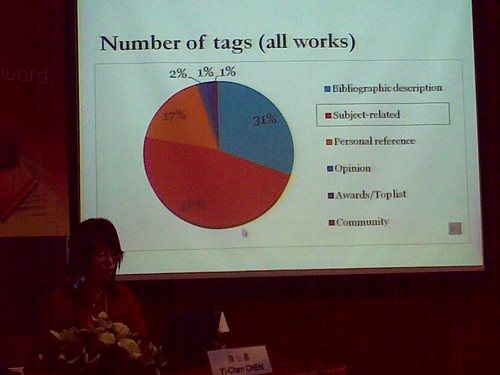
Study involved a random sample of "most often tagged" Fiction & Non-fiction records in librarything.com

Some findings
  • For Fiction titles, users tend to tag with "Bibliographic Information" (i.e. author, title, publisher)
  • For Non-Fiction titles, the tags tend to be "subjects"
When she did a comparison of the user-created tags and the Library of Congress Subject Headings (LCSH), she found:
  • 90% of tags were not reflected in LCSH (i.e. 90% of the tags were unique)
  • The overlap (between the user-tags and LCSH) was less than 12% overall
  • Tags tend to give more "genre" information, especially for Fiction works
  • In tagging, users tend to describe more character names from the books
  • Tags often had simpler and informal usage on person names, geographical names

My rambling thinking-aloud
I think when "social tagging" or "folksonomy" is mentioned, there will be some librarians who will inevitably pooh-pooh the former and start extolling the virtues of Authority Control exercised by librarians (i.e. LCSH).

That sort of argument -- of which is "better" -- is is irrelevant. It's like asking, "Is it better to search by author or by subject"?

The answer depends on what you prefer, and what you hope to find.

I noted that the areas of overlap between "social tags" and LCSH is only 12%, i.e. there tends to be different set of results retrieved, depending on whether you use tags or LCSH.

That suggests to me that it's really about different ways to find a book, according to users' preferences.

There are pros and cons: those who aren't familiar with LCSH can go by social tags. It is informal (i.e. not constrained by rules) and hence more easily remembered by those not familiar with LCSH. But there tends to be more misses in finding records, since the nature of social tagging there isn't any effective means of standardising the terms used (unlike LCSH).

I know some libraries are developing a sort of "hybrid systems" that marries -- or tries to bridge -- a structured and more consistent system like LCSHs, and a more user-oriented system like social tagging.

We'll see.

Thursday, January 28, 2010

Sports@Public Libraries: in celebration of Singapore 2010

Received this email and media release, issued from my NLB Corp Comms colleague, on 25 Jan:
The National Library Board (NLB) spotlights the man in the street as it launches a vibrant calendar of sports related events and activities in celebration of the Singapore 2010 Youth Olympic Games.

Themed Sports@Public Libraries, the series of programmes aims to inspire the spirit of sportsmanship among the community and encourage it to embrace the Olympic values of excellence, friendship and respect.

I've posted the full media release below.

Here are some related posts over at the public library teens services blog, Y.O!:

My colleagues plan to release a series of related videos on YouTube.

More on this soon.


National Library Board Launches Sports@Public Libraries In Celebration of Singapore 2010


Singapore, 25 January 2010 – The National Library Board (NLB) spotlights the man in the street as it launches a vibrant calendar of sports related events and activities in celebration of the Singapore 2010 Youth Olympic Games.

Themed Sports@Public Libraries, the series of programmes aims to inspire the spirit of sportsmanship among the community and encourage it to embrace the Olympic values of excellence, friendship and respect.

Inspiring Youths Through Various Channels
One Asia-wide initiative was the ‘Youth Writers Awards Asia 2010’, a short story writing competition for youths in Asia, jointly organised by NLB and Reader's Digest Asia. Participants aged between 13 to 17 years had to submit short stories based on the theme, 'Dare to Dream: Stories of Imagination, Passion and Sporting Excellence'. The organisers received over 1,000 entries from various Asian countries, including those within the ASEAN region. Winners of the competition will be announced at the end of January 2010.

To further inspire creative self-expression among our youths, the ‘What I Would Like the World to Read’ initiative by NLB’s Public Libraries offers them the avenue to share their passion and knowledge on sports with their peers using multimedia such as videos and podcasts. This initiative not only promotes reading among the teens by highlighting the libraries’ collections but also engages the youths by encouraging them to contribute their recommendations via blogs.

In addition, the Public Libraries will work with secondary school students to design a card game through the nationwide competition, ‘Design a Card Game National Contest’. In collaboration with the Singapore Sports Council, another set of card game will be produced to feature 26 Team Singapore athletes and their sport.

A Slice of Sporting Action for Everyone

The action will not just be limited to youths. Children interested in expanding their knowledge on the sports competed at the Singapore 2010 Youth Olympic Games can do so through the Sport Fiction Map, where they can trace the country of origin of a particular sport and learn about interesting nuggets of information. Moreover, this resource guide offers a listing of the fiction titles available for further reading at the Public Libraries.

To promote understanding and bonding among the community on the spirit of sportsmanship, the ‘Stories Next Door’ competition, held till May 2010, allows the public to either nominate a champion who has demonstrated the Olympic values of excellence, friendship and respect through his or her daily activities or submit photographs which showcase those values.

As part of the Public Libraries’ outreach efforts to the underserved groups of the community, the Sports for People with Disabilities event will be held in June 2010. This initiative aims to highlight individuals who, though physically-challenged, manage to overcome their disabilities and continue to participate and excel in sporting events.

Said Dr N Varaprasad, Chief Executive of the NLB, “As Singapore gears up for the Singapore 2010 Youth Olympic Games in August, the NLB hopes to play its part in bringing sports to the masses through our network of Public Libraries. We hope that through our range of displays, programmes and publications, the public will gain greater awareness and appreciation of the Olympic values of excellence, friendship and respect and embody these ideals through their daily life.”

Showcasing Diversity Through Sports

The public can also enhance its knowledge on the featured competitive sports of the Singapore 2010 Youth Olympic Games through the displays at the network of Public Libraries. Each of the libraries would highlight useful information regarding a particular sport, complemented by resources and publications for those looking to extend their knowledge. Besides, they can look forward to workshops, talks and exhibitions which will commence from May 2010 under the Go Sports! series. Storytelling sessions for children based on sports values will also be conducted by the Public Libraries’ librarians throughout the month of June.

For more information on the series of activities organised by the NLB in celebration of Singapore 2010 Youth Olympic Games, the public can visit the Public Libraries website at www.pl.sg.

Sunday, January 24, 2010

An introduction to Creative Commons licensing for photographs

From digital-photography-school.com, on an introduction to CC licensing for photographs:
"... But aren’t you afraid someone will steal your images?

Honestly, I don’t believe any licensing mechanism will keep people from stealing your images. If a photo is available to view on the internet, someone may use it regardless of whether you reserve all rights on the photo or not. Licensing your works under Creative Commons does not make it any easier or harder to infringe on your copyright.


What is the benefit of using Creative Commons?

As a photographer, I want my images to be seen by as wide an audience as possible. That, beyond all else, is my ultimate goal.

... When I started licensing my images with under Creative Commons, I saw a huge increase in the number of sites showing and linking back to my images. There are many tools and search engines available to find CC works and I want my photos to be available to them.


What about getting paid?

... Regardless of my licensing, I still have photos shown in galleries and still sell
prints and books containing my images. In actuality, I credit much of my success in photography to Creative Commons as it has increased my exposure and thus brought in new viewers and potential clients."

LINK

BTW, if you're located in Singapore and have adopted any one of the CC Singapore license, email me. I'll include you in the Creative Commons Singapore blog.

Monday, January 18, 2010

Al Jazeera Creative Commons Repository: Daily life in Iraq

Learned about the Al Jazeera CC Repository from this post:
Last year, Al Jazeera launched their Creative Commons Repository with 12 videos shot in Gaza under CC’s most open license, Attribution only. Since then, Al Jazeera’s collection has grown, and their most recent footage includes videos documenting everyday life and culture in Iraq.

I'm sure Al Jazeera has considered the use of its video by its rival money-making broadcaster, but think about it -- the rival broadcaster has to acknowledge Al Jazeera as the creator (as per the CC license), which means it's free advertisement:
The good news is that the video and all others in this repository are licensed CC BY, so someone can help translate this into English or other languages, for use by rival broadcasters or in documentaries.

... All Al Jazeera CC repository videos are available via CC BY, which means you can edit, adapt, translate, remix or otherwise use them as long as you credit Al Jazeera.

Saturday, January 16, 2010

Kevin says "NLB’s ‘myLibrary’ Facebook App is damn shiok!"

"Shiok", a colloquial term frequently uttered by Singaporeans, can mean "Great!" or "Excellent".

Or possibly what Robin would say to Batman, "Holy 'Library 2.0', Batman!"

My friend, Kevin, created this video review/ blog post of NLB's Facebook app called myLibrary - apps.facebook.com/nlbmylibrary


LINK

Kevin wrote:
What’s interesting about the app is that it integrates much of our typical library transactions right into Facebook.

At first we might wonder, “What’s the big deal about a Facebook app? Can’t we already access the same services by going to the library’s web site?”

True that, but more than just a matter of accessibility, it’s about being “within reach” to users, and extending their library use into the third place. Allowing users to recommend books to friends or posting what they’re reading directly onto their Facebook profiles is very much for the library’s win (i.e. word of mouth).


Thanks for the video, Kevin!

The myLibrary app is primarily targeted at NLB members, who are also FB users. Details of the FB app is at this FAQ page at www.pl.sg:
myLibrary offers the following suite of features and NLB services:

1. Account checking: users can perform library transactions and view information pertaining to their library accounts including overdue items, fines information and item reservation.

2. ASK! A Librarian service: users can send information-related enquiries to librarians who will respond within three working days. They can also view selected user enquiries and librarian responses.

3. New arrivals: users can view and search for the latest items available from NLB libraries.

4. Events: users can view and search for information on upcoming events and exhibitions held at NLB libraries.

5. Blogs: users can view the latest blog entries from NLB’s family of blogs including High Browse Online, Read and Reap and YO!

6. MyStuff: this is a virtual shelf to which users can save content (i.e. blog entries, event and item information, enquiries/responses) available in MyLibrary.

7. Recommendations: users can recommend items and information available in MyLibrary to friends. In the Recommendations tab, users can view their own recommendations as well as what others have recommended to them.

8. Post to profile: this Facebook feature has been enabled for users to post content available in MyLibrary on their profile page for others to view.

9. Invite: users can invite their friends to add MyLibrary to their Facebook accounts.


The myLibrary app is something I find useful, and I'm not just saying this because I work for NLB.

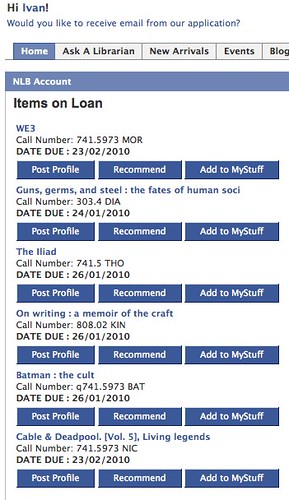
I login to Facebook more than I visit the library website (I bet this is true for many FB users who are NLB members). So by linking my Facebook account with my NLB account, I can see my loan record when I'm in Facebook (the link can be deactivated anytime).

Here's a list of what I've borrowed:
NLB myLibrary on Facebook | Home

In anticipation of questions concerning data privacy and security, the NLB FAQ says "...all account information and library transactions will take place within NLB computer systems that adhere to strict Singapore Government security and data protection guidelines."

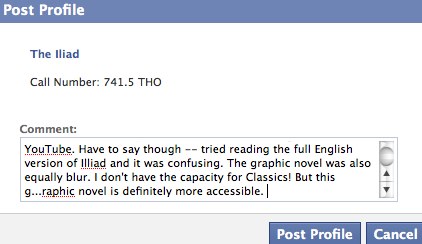
My favourite feature is "Recommendations", combined with "Post to Profile". From my loan record displayed in Facebook, I can click on the "Post Profile" button and type in some comments:
NLB myLibrary on Facebook | Post to profile

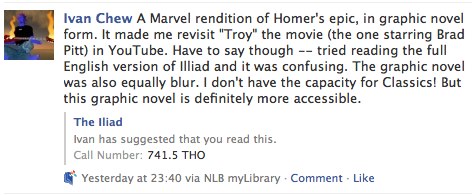
Then it'll be posted to my FB profile, which my FB friends can view (depending on your FB privacy settings).
Facebook | Posted to profile

If my FB friends feel like it, they can leave comments at the profile posting itself. Just occurred to me that if Twitter is "microblogging", then the myLibrary Recommendations feature is like "micro-book review and book discussion" combined.

Would be even better if bookcover images could be displayed, and also not to truncate the book title. The NLB project team will try to introduce refinements.

If you've any feedback or suggestions for the myLibrary app team, there's a "Contact the Developer" link at the bottom of the app page. Or leave a comment here and I'll redirect them to the team.

They'd be keen to know if you think the app is shiok or not :)

Sunday, January 03, 2010

My 2010 "present" for the world: Crystal Tears and the Dream Nebula

The title of this post might sound overly dramatic. But I really mean it as such.

Each time I use a Creative Commons licensed material, I consider myself as having received a gift.

In return, by releasing my work under a CC license, it's my way of giving back.

Here's my 4th Creative Commons music project. This one was a year-long project with my band buddy, Adrian.

The individual tracks, or the entire album, can be downloaded from: Archive.org | Bandcamp.com | Jamendo.com. More details at the band blog.

Album cover preview: "Crystal Tears and the Dream Nebulae"
*NOTE: Please credit Track 06 "Goodnight Not Goodbye v2.2." to:


Creative Commons License2010 Crystal Tears and the Dream Nebula by Starfish Stories : The Band is licensed under a Creative Commons Attribution 3.0 Singapore License. As long as you ATTRIBUTE the music by stating this: "Starfish Stories :: The Band - StarfishStories.wordpress.com"* in your audio, video, website, printed materials etc., you are FREE to USE, COPY, SHARE, MODIFY, or SELL (yes sell!) any of the songs from this album. In case we weren't quite clear on the above, try reading this! :)


Enjoy, world.

Tuesday, December 29, 2009

Quick testdrive and review of Sprixi.com

I learned via Lisnews.org, of this dedicated image search service called Sprixi - www.sprixi.com
Sprixi - Free images to choose and use!

"The inspiration for the name "Sprixi" came from the words "picture" and "wiki". We can't remember how it evolved from there but it had a lot to do with what domain names were available! We think Sprixi sounds fun and a little magical :) "
source: www.sprixi.com/faq

I was curious. And I had time. I decided to do a quick testdrive and review of the service.

First impressions
What's immediately apparent is that the search interface is simple and intuitive (Google's influence is clearly there, I thought).

The results display page is also intuitive and easy to navigate. You can "teach" the Sprixi, on the degree of relevance of the image to the "topic", by rating the image:
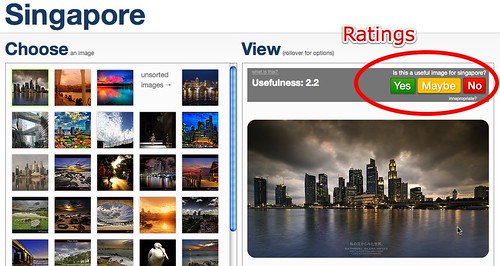
Singapore images - Sprixi - Free images to choose and use!

At the bottom of the image, you see information like its title, the owner's URL via their Flickr profile (I wonder what's the treatment for images from non-Flickr accounts), and the license.
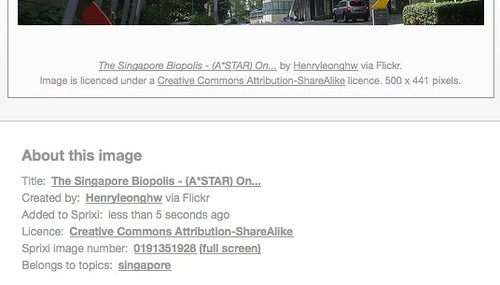
Singapore images - Sprixi - Credits display

Downloading images
To download the images, click on the green "Use" button (not shown in screenshot, but you're not likely to miss it on your browser).

It's smart of Sprixi's developers to make it as hassle-free for the user to credit the content owner. You can download images with or without credits appearing on their downloaded image (i.e. "image without credit"). There's an option for users to copy the pre-formatted acknowledgment text.
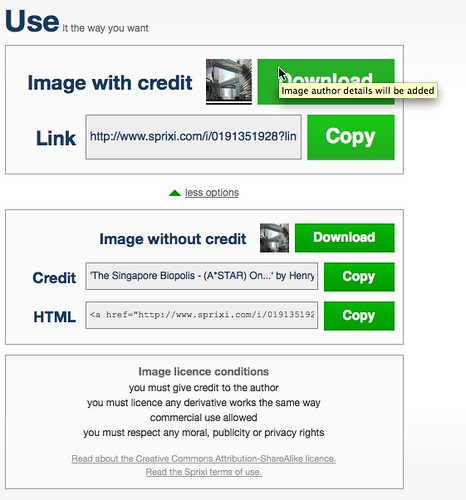
Singapore images - Sprixi - download/ credits options

If you click on the Download "image with credits" button, Sprixi would automatically include the credits at the bottom of the downloaded image:
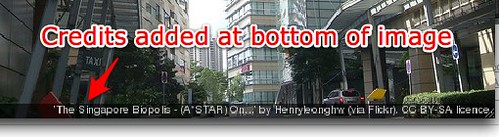
Downloaded image - credited


I've a question though: the "link to image" -- and this is an image hosted on Flickr -- brings the user back to the Sprixi page (i.e. link says "http://www.sprixi.com/i/0191351928?link=direct&size=4").

According to Flickr Community Guidelines, it says if we post a Flickr image on an external website (like Sprixi.com is an external site), the photo must link back to its image page. Either Sprixi has an agreement with Flickr, or its developers have overlooked this.

Personally as a user, I think the issue can be easily resolved with Sprixi just linking back and displaying the Flickr page.


Contributing to Sprixi
Sprixi allows users (you have to be registered) to either upload their images to Sprixi or link to a Flickr image.

If you're uploading your own image, you're required to choose a Creative Commons license. Question: why not provide a CC Zero option?
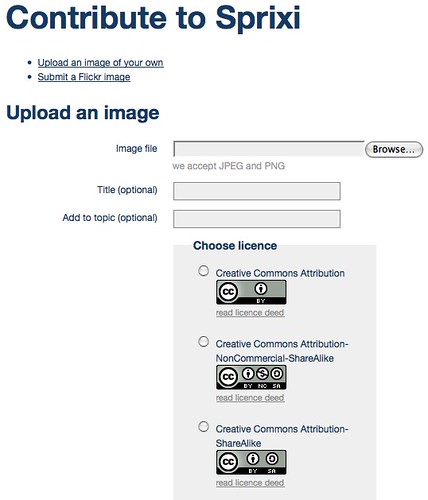
Sprixi - upload your own image


To let Sprixi know of a Flickr image, just submit the URL of the Flickr page.
Sprixi - contribute via Flickr


More on contributing images to Sprixi - submit Flickr image
I was curious on how the submission process worked.

To test it out the "Submit a Flickr Image" option, I tried:

Here's how my Flickr image appeared upon submission:
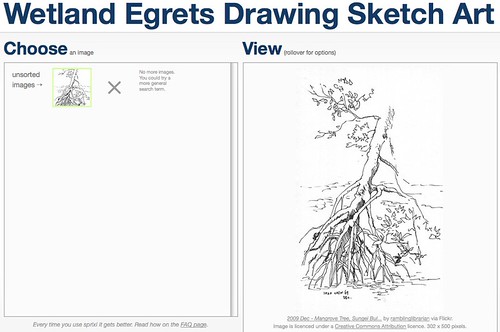
Wetland Egrets Drawing Sketch Art images - Sprixi - Free images to choose and use!

The accompanying image information was automatically retrieved from Flickr, so I didn't have to provide any details.
Wetland Egrets Drawing Sketch Art images - Sprixi - Free images to choose and use!

I might have been over-zealous in inputting the "topic". Actually I didn't have any reference on how many keywords were considered appropriate.

Another observation was that there wasn't a way for me to edit a submission. For instance, I'd mistakenly included "Egrets" for the above image, which clearly didn't have any birds.

Question: Does the number of submitted keywords/ topic-words improve the image's chances of being retrieved, or would it make the image less findable? And how much that would be off-set by user ratings?

I think it depends on how fast the system learns. At first, there were no results for "wetland mangrove". But as I tried different combinations of the topics I submitted, the system was able to offer my earlier submission as a suggestion:
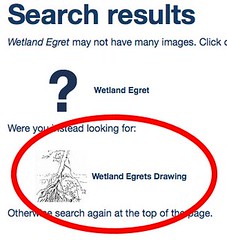
Sprixi - Free images to choose and use!

I discovered I could rate my own Flickr image (hmm... would this lead to some contributors trying to game the system and make their image appear higher in terms of relevance? Or maybe other raters would ensure a proper check and balance -- would be interested to learn how this feature pans out).
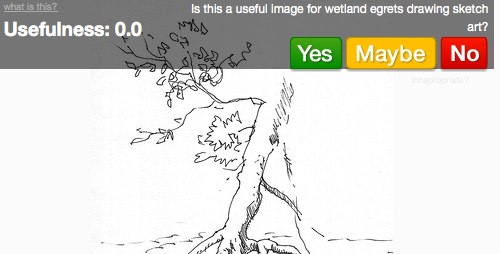
Wetland Egrets Drawing Sketch Art images - Sprixi - Free images to choose and use!

As for Flickr images that belonged to other people, Preetam's image appeared right away:
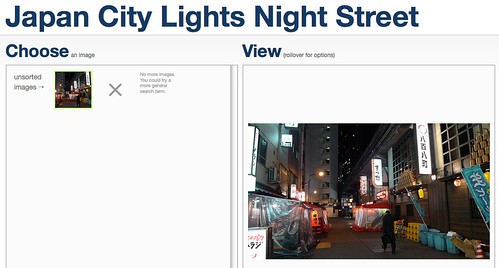
Japan City Lights Night Street images - Sprixi submission

But not Kenneth's image though (a bug?):
Sprixi - Free images to choose and use!


What if I submitted the URL for Flickr images that weren't licensed under CC?
It's a good thing I'm not a cat (nevermind...) so I found another friend's non-CC licensed Flickr image which anyone can view.

Result: "Image was not added".

I immediately submitted a CC-licensed image (also for public view) and got the same "image not added" message. Maybe the Flickr CC license verification process was buggy. The Flickr image submission process wasn't consistent.


Uploading my own images
I seem to have encountered some bugs when I submitted images from my computer (they were the acceptable file formats JPEG and PNG). The submitted image didn't appear, and I don't recall seeing any messages indicating problems with the submission:
Music Album Cover images - Sprixi - Free images to choose and use!

I tried again, using another image, and this time it appeared to work. Though the image didn't appear right away (what's happening backend -- moderation?):

Musicians Singapore images - Sprixi - Free images to choose and use!


Sprixi is Learning
I think Sprixi will need some more time to populate certain topics/ keywords.
Sprixi - "No results" message

Album Cover images - Sprixi - Free images to choose and use!

Suggestion: maybe the system could provide a way for users to browse through topics that have no results, and/ or areas that Sprixi needs to "learn" more. Actively crowd-source. Especially when half of the Sprixi idea was based on a Wiki idea. Hmm... the Wikipedia equivalent of a image-repository/ search engine.


Conclusions
Based on what I could briefly cover, overall I'd think Sprixi has potential to be a resource for royalty-free, public domain and CC-licensed images.

It's not the first image search engine, for CC-licensed images, that I know. For instance, there's www.behold.cc
Behold | Search High Quality Flickr Images

But Sprixi is the first I've come across (not that I actively looked for such purpose-built search engines) that allows for contributors to build up it's database.

Seems to me Sprixi was designed for people searching for images to use, more than for people to contribute. At least, the contribution feature performed inconsistently, at least the way I saw it.

Not to say the contribution feature isn't well designed -- it generally is. I think most contributors would find the features adequate. But personally I'd like to be able to:
  • Edit the topics for images I've contributed
  • Delete/ remove a Flickr image whose URL I've submitted
  • Be able to provide more item details, e.g. a text box so that I can input more details as part of the credits. For instance, I've an image that incorporated other CC-BY images. According the the CC terms, I'm required to credit the sources. At this point, Sprixi doesn't have a way for me to do that. Which means I cannot upload my original content that contains other people's CC images. I probably have to use Flickr instead.
So Sprixi isn't a CC-sharing platform in that sense.

I suspect that Sprixi would have to introduce a "Community Flagging" feature. I saw some images whose copyrights might be questionable.

Still, I'm not complaining.

My feeling remains that there will be more purpose-built search engines for CC-licensed materials.

It's all good.
Sunday, December 27, 2009

My 2009 'Social Media' related publications in IFLA and Emerald

Two of my professional publications, relating to social media, that were accepted and published in 2009.

1) Title: Librarians 2.0: sowing padi in (the) SEA.
Publisher: Emerald Group Publishing Limited - LINK.

This came about from my speaking at the Bridging Worlds conference organised by NLB in 2008. After the conference, my paper was selected by Emerald for consideration. It was accepted and published in their special conference issue.
Abstract:

Purpose – The purpose of this paper is to present an exploratory survey as part of a presentation for the Bridging Worlds 2008 conference. It seeks to understand how library institutions in the South East Asia (SEA) region have implemented Web 2.0 technologies – blogs, RSS feeds, wikis, or the use of services like Flickr, YouTube, de.lici.ous.

Design/methodology/approach – Libraries surveyed were in: Hong Kong, India, Indonesia, Japan, Malaysia, People's Republic of China, Philippines, Singapore and Taiwan. The survey relied on references in published papers, internet searches and personal contacts.

Findings – The survey found that more academic libraries than public libraries were using Web 2.0. technologies. Blogs and RSS feeds were the most common. Blogs were used mainly as web publishing tools rather than as a means to engage library users.

Research limitations/implications – The survey is not comprehensive. The search relied mainly on English publications and keywords, while the native language of most countries surveyed was non-English. Future research could comprehensively cover each country, by the type of library or language.

Practical implications – The paper contends that Web 2.0 does not rely on technology, but more on practice and participation. The emphasis should be on relationships rather than transactions. Suggestions are offered on how libraries can adopt a Library 2.0 mindset without focusing on technology. A call is made to establish an East Asian Librarians 2.0 directory.

Originality/value – The paper offers a non-technological perspective to institutions and practising professionals who are reviewing their Web 2.0 implementation.


2) Title: Web 2.0 and Library Services for Young Adults: An Introduction for librarians.
Publisher: IFLA, Libraries for Children and Young Adults Section.
78 pages, PDF - LINK

As explained here, this came about because on the last day of my 2008 speaking trip in Croatia, Dr. Ivanka Stricevic asked if I could write -- at least 22-pages (double-spaced, Times Roman 12) -- on how librarians can use social media in serving Young Adults. It was to be written in English, for translation into Croatian.

My final draft was a whopping 78 pages. Thankfully, Ivanka didn't ask for it to be edited down after she read it.

BTW, the copy published at the IFLA Libraries for Children and Young Adults Section page is under a CC-BY-NC-SA 3.0. license.
[Excerpt from the Introduction]
"The document is an introduction for librarians new to Web 2.0 and Social Media, and who are interested in using publicly accessible social media tools to serve Young Adults in any types of libraries: public, school, special or academic.

The aim is for you—the practicing librarian--to understand and ultimately decide for yourself what is the best approach in using social media as part of your Young Adult service. This document does not dictate the best way to attract teens to your library (there is none!)

For each section, we will cover the "What is it" and "How to use it" so that you know "Why use it" and "What to look out for in using it". With the focus for practitioners, specific services are also elaborated."


CONTENT PAGE

P2. Introduction
  • Why Web 2.0 and Services to Young Adults?
  • Managing risks
  • Web 2.0 + you and your library
  • More about this document
  • Terminologies used in this document
  • Disclaimer
P7. Acknowledgments
P8. Blogs and Blogging
P14. Online Chat, Instant Messaging and Video-conferencing
P18. Creative Commons
P24. FaceBook
P28. Flickr
P32. Google Docs
P37. Music & Audio
P40. MySpace
P43. Podcasts & Podcasting
P47. RSS & RSS Readers
P53. Slideshare
P56. Social Bookmarking
P61. Twitter
P65. Video
P68. Virtual Worlds & Machinima
P73. Wikis
P76. Conclusion
  • Which tool is most suitable, and how much time would it take to learn?
  • The “Art of Social Networking”
P77. Appendix
  • Web 2.0 and Library 2.0, in brief
  • A suggested approach when adopting Web 2.0 tools

Monday, December 21, 2009

Book: Blogging Heroes

“Blog for readers, not to get readers”. (p.200)

If you're hoping for tips to make your blog into an overnight success, forget about this book.

cover
ISBN: 0470197390

This book certainly has a catchy title. Though it wasn't what I initially expected. It's not about bloggers who overcame adversity and controversy to emerge triumphant over Evil (my imagination tends to be a bit wild).

If this were a graphic novel, it would be an "Origins" story, where each superhero share his/ her tale of "how they came to be".

In a way, you might see this as a book on "Who's Who in Blogs", from the author's view. BTW, in the Preface, author Michael A. Banks explains more on how he decided to write about the selected 30 bloggers who "stand out as influential, ground-breaking, and singularly successful".

There is no hero-worship though. The book is a very readable, insightful and honest report of the bloggers -- how their blogs got started, their motivations, thinking, and even problems with regards to their blogs.

The recurring themes, to me, were:
  • To blog well, you have to write what you care about. Or, care about what you write.
  • It’s about consistency in what you feature in your blog. Your blog should have a focus or mission, purpose, theme -- but not necessarily a narrow focus or to limit your blog to certain topics per se.

One of the best quotes for me is on P.197, where Scott McNulty (TUAW) has this to say to bloggers who wonder why no one comments on their blogs:

“… It’s not going to happen overnight. It’s the same as everything else: If you work hard and stick to It,s eventually you’ll grow your audience. People will start commenting, a little community will grow, and from there, (you) just keep it going.”
He also adds:

“Blogging is a public discourse… don’t write anything that you wouldn’t say to someone face-to-face. So take accountability for your actions and never be ashamed of anything you write. The best way to accomplish that is to think about it before you write.”

In putting the book together, Michael Banks personally interviewed each of the 30 bloggers by phone -- not email, as that would have been lazy, in his opinion.
THE THIRTY
  1. Dave Taylor - The Intuitive Life Business Blog
  2. Chris Anderson - The Long Tail
  3. Gina Trapani - Lifehacker
  4. Ina Steiner - AuctionBytes
  5. Mary Jo Foley - All About Microsoft
  6. Dave Rothman - TeleRead
  7. Frank Warren - PostSecret
  8. Mike Masnick - Techdirt
  9. Mark Frauenfelder - BoingBoing.net
  10. Robert Scoble - Scobleizer
  11. Peter Rojas - Engadget
  12. John Neff - Autoblog
  13. Ken Fisher - Ars Technica
  14. Deborah Petersen - Life in the Fast Lane
  15. Joel Comm - JoelComm.com
  16. Brian Lam - Gizmodo
  17. Kristin Darguzas - ParentDish
  18. Christ Grant - Joystiq
  19. Scott McNulty - The Unofficial Apple Weblog (TUAW)
  20. Philipp Lebsseb - Google Blogoscoped
  21. Brad Hill - Weblogs, Inc.
  22. Steve Rubel - Micro Persuasion
  23. Rebecca Lieb - ClickZ
  24. Deidre Woollard - Luxist
  25. Gary Lee - An Internet Marketing Website
  26. Richard MacManus - Read/WriteWeb
  27. Eric T. - Internet Duct Tape
  28. Victor Agreda - DIY Life
  29. Steve Garfield - Steve Garfield's Video blog
  30. Grant Robertson - Download Squad
Whether you're new to blogging or you've been blogging for years, I'm sure one you'll be able to gain some insights from what these Blogging Heroes have to say.

The 30 featured bloggers are smart but ordinary persons, as I found out.

Heroes, by definition, achieve great things or have noble qualities.

But heroes are not made overnight. Even if they gain their powers instantly (I can think of Spider-man and Captain America), they perfect their craft through consistent efforts.

That, I think, is the point of the book.

Sunday, December 13, 2009

Post workshop reflections: Using Wikis for communication (Round 2)

Completed the second run of the "Using Wikis for Communications" workshop at the Civil Service College last Friday. As before, my segment was a 1.5 hr segment during the 2-day course organised by CSC.

Learning from my earlier round, this time in addition to revising the handouts (with a more detailed step-by-step guides), I prepared more scenarios for participants' to work on. For instance:
  1. Share your favourite recipe (e.g. Ingredients, Preparation)
  2. Provide directions to your favourite eating places in Singapore
  3. Create a website to publicise your seminar/ talk at Civil Service College. The site should allow participants to RSVP their attendance, and also directions to the venue.
  4. Construct an Educational website (please decide on a topic/ theme, e.g. Learning to Play the Guitar). Each page should have links to text and multimedia content. Include a Discussion section.
  5. Your boss has asked you to plan a trip to a deserted island, where you have to stay for at least TWO weeks. Create a site to help plan your adventure.
Item 1 and 5 was a result of bouncing off some ideas with Kevin and Julian. They happened to be online and obliged me with a quick discussion on possible hands-on activities for the workshop.

Interestingly, no one took up #5. The most popular activity was the one on sharing one's favourite recipe. I wonder if this would be the same in the next run.

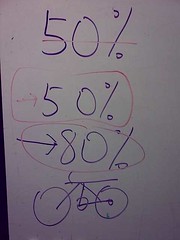
Before that, I wanted to manage the participants' expectations. I drew this on the while board:
CSC wiki workshop, 10 Dec 2009

My explanation was this:
  • 50% of the workshop will be on "How to create a Wiki/ edit pages/ How a Wiki works".
  • The other 50% has nothing to do with Wikis, or any social media platform; it's really about planning/ creating what you'd like to communicate to your audience.
  • 80% of you would probably never edit/ create a wiki after the workshop.
  • Finally, the Bicycle Analogy: Some one may show you how to built a bicycle and how to ride it. But ultimately, only you can decide where you want to go.


p.s. shared this at Facebook, if you can see it.